
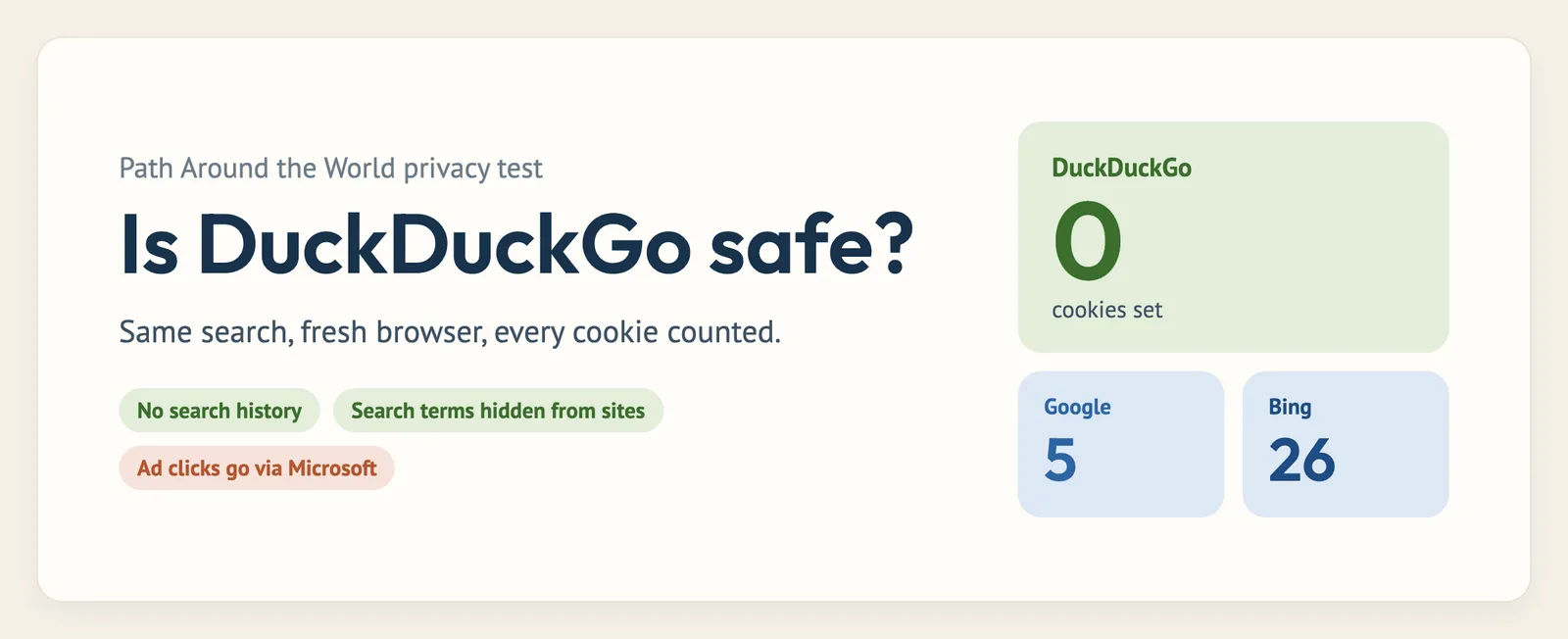
“Is DuckDuckGo safe?” is one of the most common questions I get in the comments, and it’s also the most-searched question about DuckDuckGo, period. Fair enough. If you’re switching search engines for privacy, you want to know the privacy is real.
So instead of paraphrasing DuckDuckGo’s privacy policy back to you, I tested it. I ran searches in a brand-new browser and counted every cookie, captured exactly what DuckDuckGo’s page sends back home, decoded where its ads send you, and checked what the websites you click through to can see.
The short answer: yes, DuckDuckGo is safe. In my test it set zero cookies (Google set 5 and Bing set 26 for the same search), it doesn’t keep your search history, and it hides your searches from the sites you visit. There’s one real catch, which is clicking its ads, plus a couple of things you have to take on trust. I’ll walk through all of it below. (If you want the bigger picture on the company itself, read my full DuckDuckGo review.)
- Is DuckDuckGo safe? The quick verdict
- Does DuckDuckGo track you?
- What DuckDuckGo collects (and what it doesn’t)
- Does DuckDuckGo hide your IP address?
- Who can see your DuckDuckGo searches?
- The catch: clicking ads
- Does DuckDuckGo sell your data?
- Is DuckDuckGo secure?
- Is the DuckDuckGo browser and app safe?
- DuckDuckGo vs incognito mode
- Is DuckDuckGo safe for kids?
- How to make DuckDuckGo even safer
- FAQ
Is DuckDuckGo safe? The quick verdict
| Question | Answer | How I know |
|---|---|---|
| Does it track you? | No | 0 cookies, no user ID in any request (my test) |
| Does it save your search history? | No (not linked to you) | Privacy policy; it keeps search terms only anonymously |
| Can websites see what you searched? | No | Its pages tell your browser to send only “duckduckgo.com” |
| Does it hide your IP address? | Partly | It doesn’t store it, but it (and sites you visit) can see it |
| Does it sell your data? | No | It doesn’t collect personal data to sell |
| Are its ads private? | Until you click one | Ad clicks pass through Microsoft (decoded link) |
| Is it independently audited? | No | No public audit exists; its server-side claims are trust-based |
Does DuckDuckGo track you?
No, and this is the part I could actually measure. I opened a completely fresh Chrome profile (no history, no cookies, no accounts) for each search engine, searched “best hiking boots” without clicking any consent pop-ups, and logged every cookie and network request with Chrome’s developer tools.
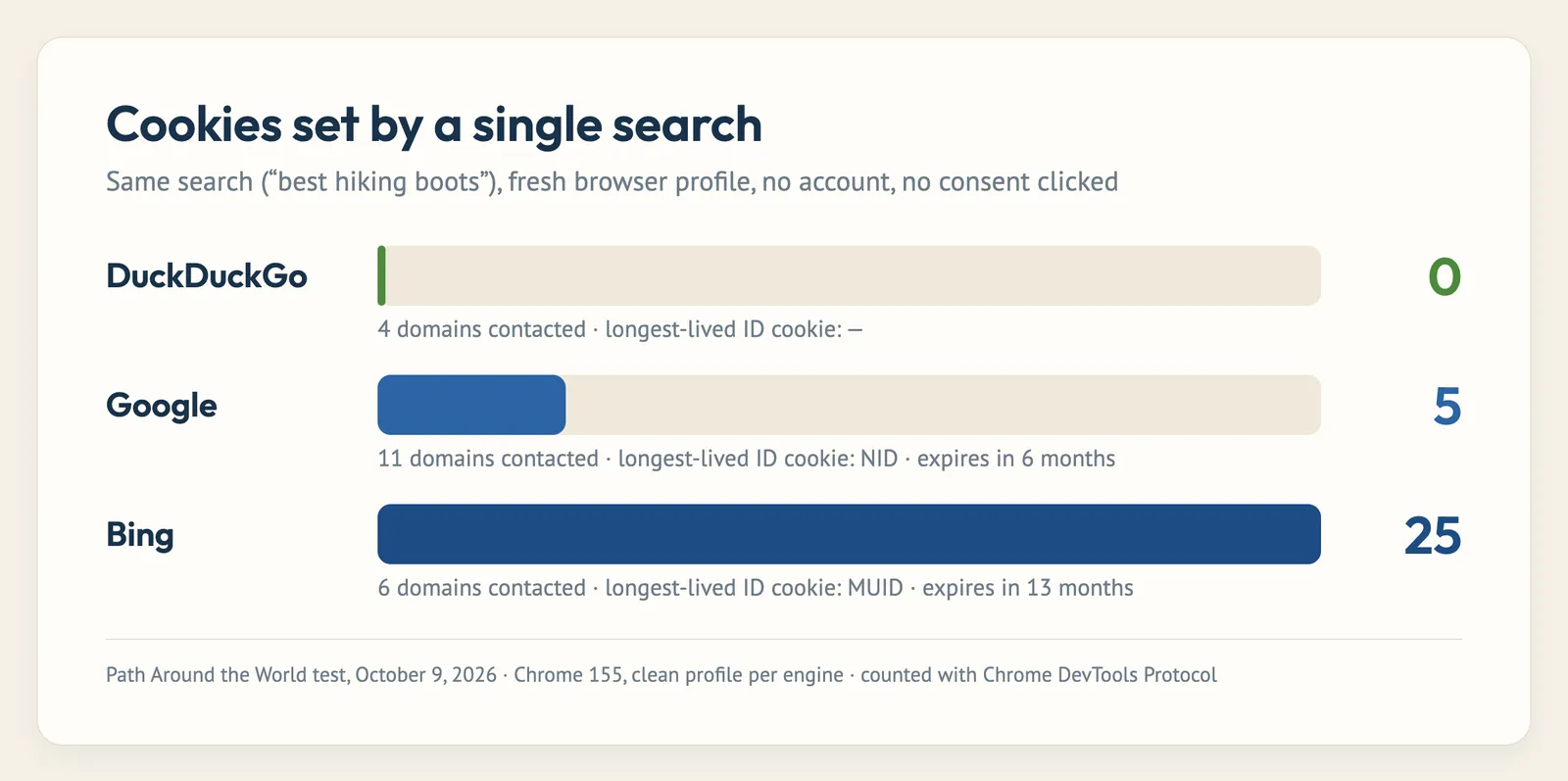
DuckDuckGo set zero cookies and only talked to its own servers. Google set 5 (including an ID cookie that lasts six months) and loaded Google Tag Manager. Bing set 25 or more, including a machine ID that lasts 13 months. I re-ran the test a few hours later while researching my best private search engines roundup and got the same result: DuckDuckGo 0, Google 5, Bing 26.
Cookies are the classic way a search engine recognizes you from one search to the next. With no cookie and no account, DuckDuckGo has no way to string your searches together into a profile, which is exactly what it claims.
Is DuckDuckGo really private? What it sends home
To be fair, I went looking for anything sneaky, and I did find something worth knowing about. After each search, DuckDuckGo’s page sends small analytics pings to improving.duckduckgo.com. Here’s a real one:
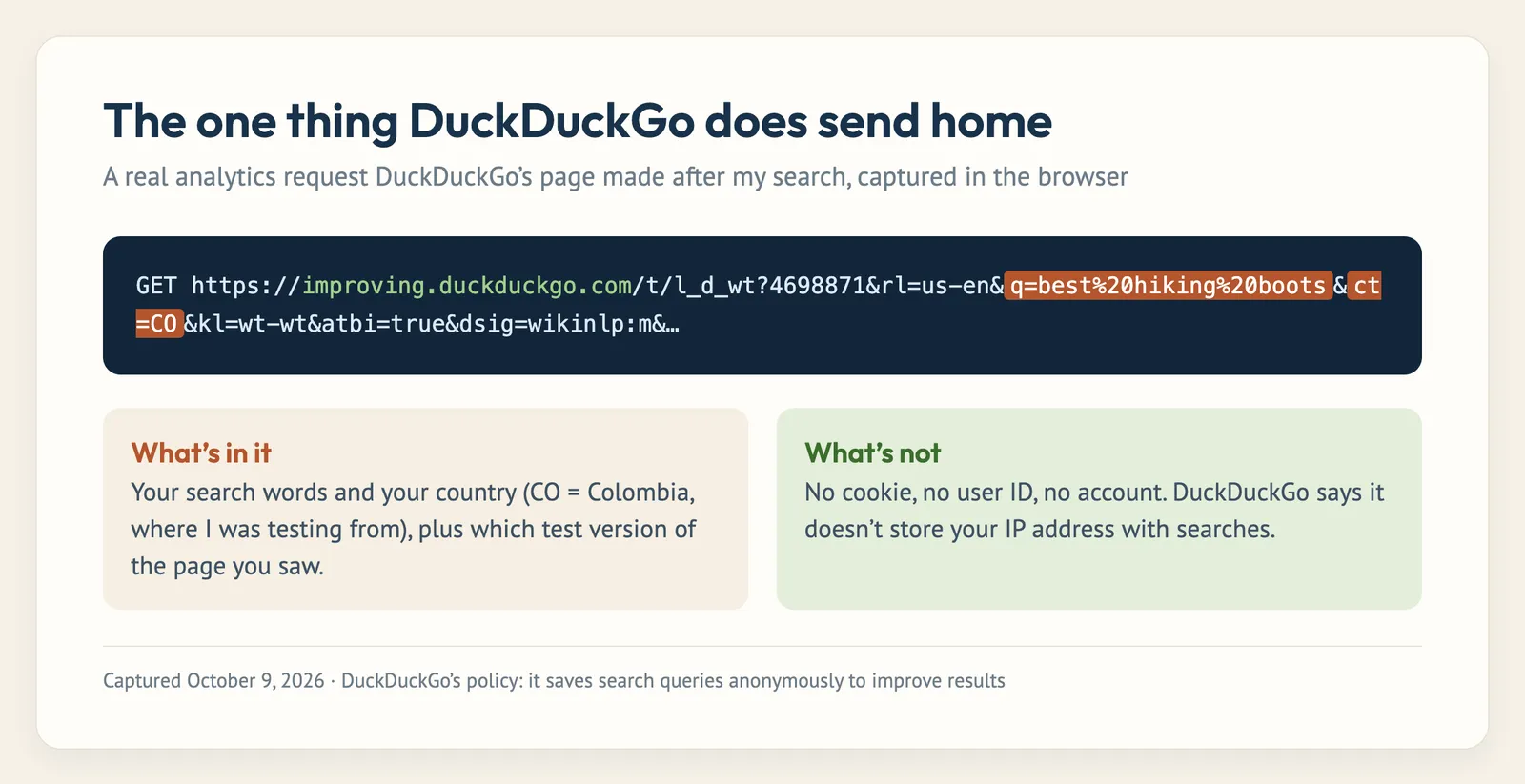
It includes my search words and my country, but no cookie, no account, and nothing tying it to my other searches. That matches the privacy policy, which says it saves search queries anonymously to improve results. Think of it as the difference between a shop knowing “someone bought hiking boots today” and a shop knowing “Nick bought hiking boots, then looked up his bank, then searched a medical symptom.” DuckDuckGo gets the first one. Google gets the second.
And if even that bothers you, DuckDuckGo’s no-JavaScript version at html.duckduckgo.com made zero analytics requests and set zero cookies in my test.
What DuckDuckGo collects (and what it doesn’t)
| DuckDuckGo does not… | DuckDuckGo does… |
|---|---|
| Save your search history or link searches to you | Save search terms anonymously to improve results |
| Store your IP address with your searches | Use your IP in the moment to show local results |
| Build an ad profile or use tracking cookies | Show ads based only on what you just searched |
| Require an account | Store settings you change in a cookie or URL parameter (not tied to you) |
| Share your identity with search partners | Proxy requests to partners like Microsoft through its own servers |
The policy’s own summary is about as blunt as it gets: “We don’t track you.” It also says it doesn’t save or share your search, chat or browsing history, and that it’s “not possible” for it to hand over search histories linked to you, because it doesn’t have them.

Does DuckDuckGo hide your IP address?
This is the most misunderstood part, so let me be clear: DuckDuckGo does not hide your IP address from DuckDuckGo or from websites you visit. Every website you connect to has to see your IP address to send the page back to you. That’s just how the internet works.
What DuckDuckGo promises is that it doesn’t store your IP address alongside your searches. It uses it in the moment (for example, to show local results; it guessed I was in Colombia, where I was testing from) and then it’s gone. When you click a result, that website sees your IP address just like it would if you came from Google.
If you need to hide your IP address itself, you need a VPN or Tor. DuckDuckGo even runs an official Tor (.onion) address for exactly that.
Who can see your DuckDuckGo searches?
People ask about this in a dozen different ways (“can my ISP see my DuckDuckGo searches?”, “can my employer?”, “can the police?”), so I made a cheat sheet:
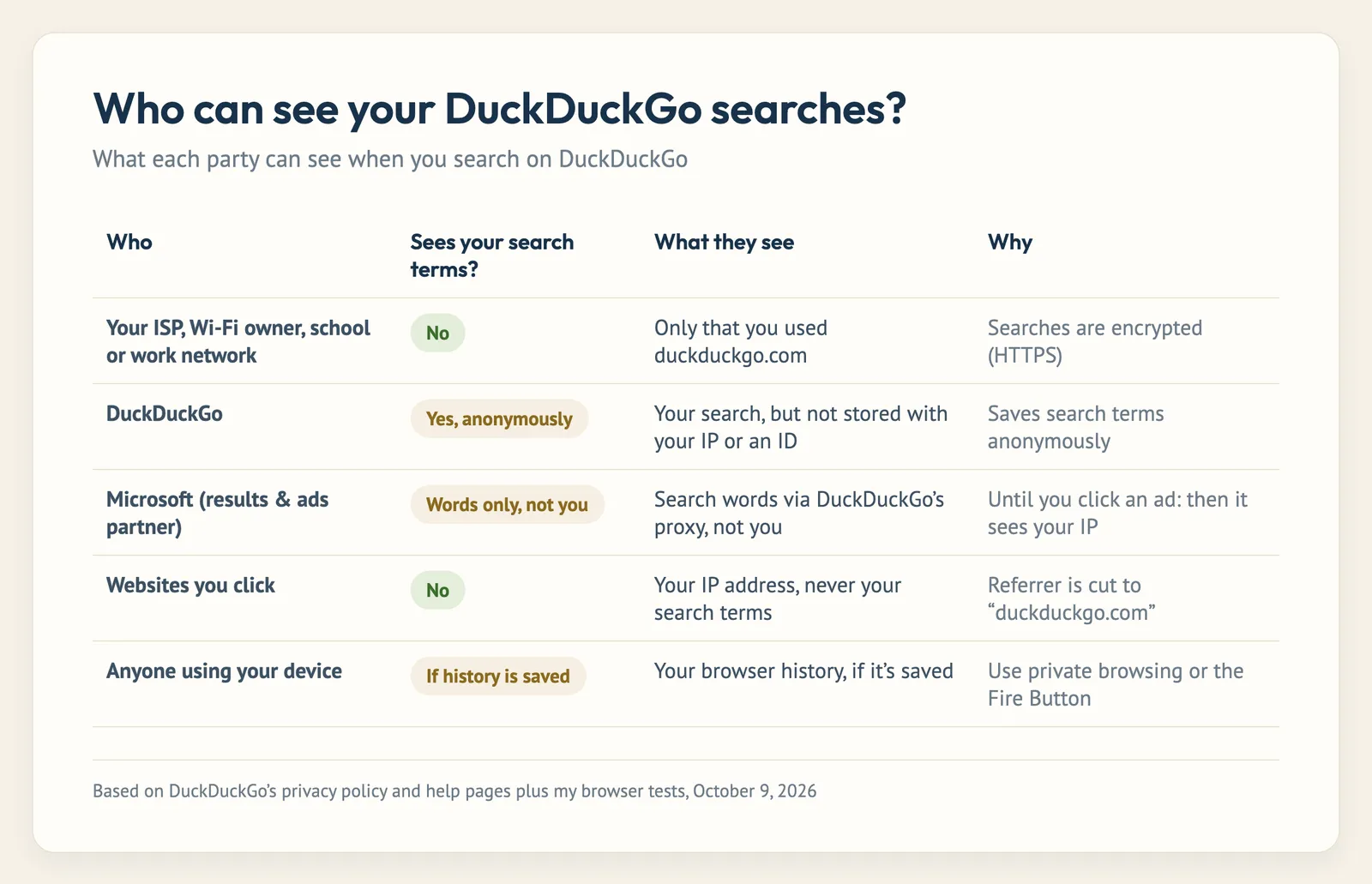
- Your internet provider, Wi-Fi owner, school or employer network: they can see that you visited duckduckgo.com, but not what you searched, because every search is encrypted with HTTPS. The big exception is a work or school device with monitoring software installed. That can see everything on the screen no matter which search engine you use.
- The websites you click: they see your IP address, but not your search terms. I checked DuckDuckGo’s results page and it sets its referrer policy to
origin, which means your browser only tells the next site “this visitor came from duckduckgo.com.” - Microsoft and other partners: DuckDuckGo gets most of its results and ads from Microsoft, but it says it proxies those requests through its own servers, so Microsoft sees the search words without your IP address or identity. Clicking an ad is the exception (see below).
- The police or government: DuckDuckGo is a US company and can receive legal requests like any other, but it says it can’t provide search histories linked to you because it doesn’t keep them.
- Anyone with your device: DuckDuckGo search doesn’t keep history, but your browser might. Use private browsing or the DuckDuckGo browser’s Fire Button if that’s a concern.
The catch: clicking ads
This is the one place DuckDuckGo’s privacy really leaks, and to its credit, it admits it. I decoded the real link behind the first ad on my results page:
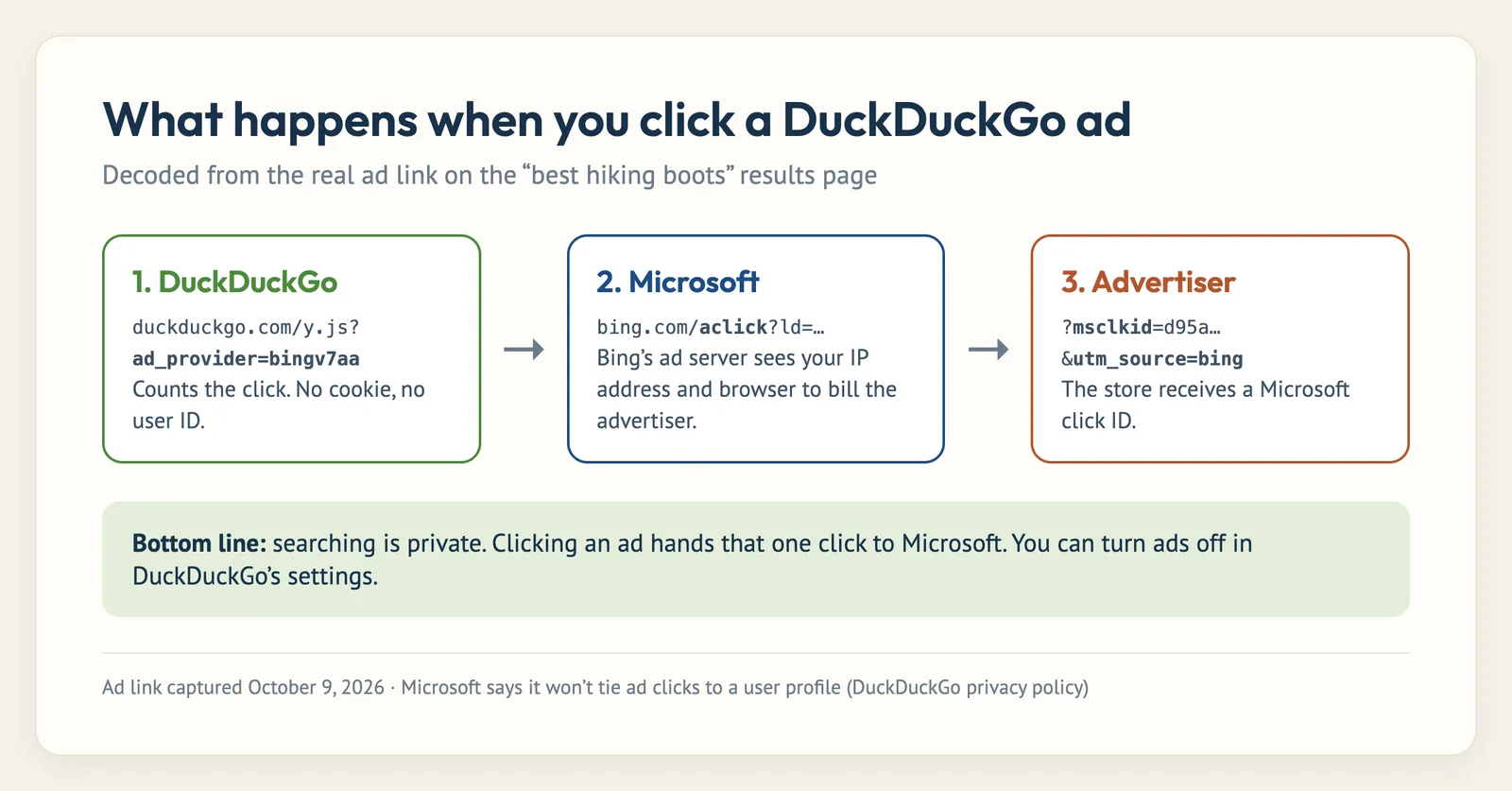
The click goes from DuckDuckGo through Microsoft’s ad server and arrives at the store with a Microsoft click ID attached. DuckDuckGo’s own help page says that on an ad click, Microsoft “will use your full IP address and user-agent string” to process the click and bill the advertiser, and that Microsoft has committed not to tie ad clicks to a user profile. A 2023 academic study of search ads found the same thing: no identifiers from DuckDuckGo itself, but Bing set identifier cookies on 95% of DuckDuckGo ad-click paths.
Ads from Tripadvisor (hotels) and Yelp (local businesses) work in a similar way, though DuckDuckGo says those partners can’t see your search query.
My advice: just scroll past anything labeled “Ad,” or turn ads off completely. More on that below.
Does DuckDuckGo sell your data?
No. DuckDuckGo makes its money from ads based on the search you just typed and from an optional subscription, not from selling data. Its help pages call the idea that search engines need to track you to make money “a myth.” And since it doesn’t keep personal profiles, there’s nothing to sell. I dig into its finances and owners in who owns DuckDuckGo and how it makes money.
Is DuckDuckGo secure?
- Encryption: every search uses HTTPS, so nobody on your network can read it in transit.
- Breaches: I couldn’t find any reported breach of DuckDuckGo user data in its 18-year history. It helps that there isn’t much user data to steal.
- Bugs: nothing is bulletproof. Its iPhone browser had an address-bar spoofing bug in 2021 (CVE-2021-44683) that was fixed. That’s normal for any browser, but keep your apps updated.
- Is DuckDuckGo a virus or malware? No. It’s a legitimate search engine and browser from a US company. What people sometimes mistake for a “virus” is a browser extension that switched their default search engine. If that happened without your say-so, remove the extension.
- Is it owned by Google or China? Neither. It’s an independent private company in Pennsylvania. I cover the ownership in detail in who owns DuckDuckGo.
The honest limitation
My tests can prove what DuckDuckGo does in your browser. They can’t prove what happens on its servers. There’s no independent audit of its no-logging promise, and even Privacy Guides (which recommends DuckDuckGo) points out there’s no guarantee that any search engine’s policy is honored. DuckDuckGo’s 18-year record, sworn testimony and business model all point the right way, but it’s still trust, not proof.
The one time that trust got dented was in 2022, when a researcher found DuckDuckGo’s browser let some Microsoft trackers through on other websites because of a confidential contract. DuckDuckGo fixed it a few months later. I cover both sides of that in my DuckDuckGo review.
Is the DuckDuckGo browser and app safe?
Yes. In fact, if privacy is your goal, the free DuckDuckGo browser (iPhone, Android, Mac and Windows) is safer than using DuckDuckGo search inside Chrome, because it also protects you on the sites you click through to:
- It blocks hidden third-party trackers on websites, not just on search.
- The Fire Button wipes your tabs and browsing data in one tap.
- App Tracking Protection (Android) blocks trackers inside your other apps.
- Email Protection gives you free @duck.com addresses that strip trackers out of emails.
And Duck.ai, its AI chat? I tested that separately, including asking it for my IP address (it couldn’t see it). Read my Duck.ai review for the full results.
DuckDuckGo vs incognito mode
These solve different problems, and you get the most privacy by using both:
- Incognito / private browsing stops your browser from saving history and cookies on your device. It does nothing to stop Google from logging your searches on its servers. Google even settled a lawsuit in 2024 over data it collected from people in Incognito mode, agreeing to destroy billions of records.
- DuckDuckGo stops the search engine from tracking you, but your browser can still save your history locally.
Use DuckDuckGo in a private window (or the DuckDuckGo browser with the Fire Button) and you’re covered on both ends.
Is DuckDuckGo safe for kids?
For privacy, it’s one of the best options, since it doesn’t profile kids for ads. For content, it has Safe Search with three levels (Strict, Moderate and Off) in its settings. Moderate is the default. Set it to Strict for kids. Just remember no filter is perfect, and a determined teenager can change a setting, so it’s not a replacement for device-level parental controls.
How to make DuckDuckGo even safer
- Turn off ads. In DuckDuckGo’s search settings, switch Advertisements off. This closes the Microsoft ad-click gap completely.
- Use the DuckDuckGo browser (or its extension) so trackers are blocked on every site, not just search.
- Turn off regional results if you don’t want your location used to localize results.
- Use the lite version at html.duckduckgo.com for searches with zero analytics pings.
- Add a VPN or Tor if you need to hide your IP address too.
- Set Safe Search to Strict on kids’ devices.
If you’re still deciding between DuckDuckGo and Google, I put them head to head in DuckDuckGo vs Google.
Is DuckDuckGo safe? FAQ
Is DuckDuckGo safe to use?
Yes. It doesn’t track you, doesn’t keep your search history, encrypts every search and set zero cookies in my test. The only real privacy gap is clicking its ads, which pass through Microsoft.
Is DuckDuckGo really private?
For search, yes. It saves search terms only anonymously, without your IP address or any ID. It isn’t “invisible,” though: websites you visit still see your IP address.
Does DuckDuckGo track you?
No. It uses no tracking cookies, no account and no user ID. My browser test found zero cookies set by a DuckDuckGo search.
Does DuckDuckGo save your search history?
No, not in any way linked to you. Your own browser may still save history on your device unless you use private browsing.
Can my ISP or Wi-Fi owner see my DuckDuckGo searches?
They can see you visited duckduckgo.com, but not what you searched, because searches are encrypted. Monitoring software on a work or school device is the exception.
Is DuckDuckGo safer than Google?
For privacy, yes, by a wide margin. Google links searches to your account or a cookie ID and uses them for ads. DuckDuckGo doesn’t. See my DuckDuckGo vs Google comparison for results quality too.
Is DuckDuckGo safe for banking?
Yes. Searching for your bank on DuckDuckGo is as safe as anywhere else. Just make sure you click the bank’s real website, not an ad, and look for the correct web address before logging in.
Leave a Comment