
I use AI chatbots almost every day for trip planning, and the thing that always bugs me is how much of my life I’m pouring into them. Where I’m going, when, my budget, sometimes even passport questions. So when DuckDuckGo started pushing Duck.ai, a free AI chat that promises to keep your conversations anonymous, I wanted to know whether it actually lives up to that.
I didn’t just read the marketing. I put Duck.ai through a hands-on test: I asked all six of its free AI models the exact same travel question and compared their answers, captured the network traffic to see what each chat actually sends, and tried to get it to tell me my IP address and location.
The short version: Duck.ai is the most private way I’ve found to use mainstream AI models like GPT and Claude for free, with no account and no training on your chats. It’s not a full ChatGPT replacement, since it has daily limits and fewer power features, but for everyday questions it’s genuinely good. Here’s everything I found.
- What is Duck.ai?
- Is Duck.ai free? Plans and limits
- Which AI models does Duck.ai use?
- My test: 6 models, same question
- Is Duck.ai private? I checked the traffic
- Is Duck.ai safe? The fine print
- Features: web search, images, voice and more
- Duck.ai vs ChatGPT
- What I don’t like
- Verdict: is Duck.ai worth using?
- FAQ
What is Duck.ai?
Duck.ai is DuckDuckGo’s AI chat service. You can open it at duck.ai, from the DuckDuckGo search page, or in the DuckDuckGo browser. Instead of building its own AI model, DuckDuckGo acts as a privacy middleman. It sends your message to well-known models from companies like OpenAI, Anthropic, Mistral and Google, but strips out who you are first.
It launched in June 2024 as “DuckDuckGo AI Chat,” came out of beta in March 2025, and has since added image generation (December 2025), voice chat (January 2026) and reasoning models (March 2026). Importantly, it’s optional: DuckDuckGo’s regular search works fine without ever touching AI, and it even runs an AI-free version at noai.duckduckgo.com. (If you’re new to DuckDuckGo itself, start with my full DuckDuckGo review.)
Is Duck.ai free? Plans and limits
Yes. Duck.ai is free with no account. You just open it and start typing. The catch is a daily usage limit. DuckDuckGo says lower-cost models use your limit more slowly than expensive ones, and long conversations cost more.
| Plan | Price (US) | What you get |
|---|---|---|
| Free | $0, no account | 6 models, web search, image generation, voice; daily limit |
| Plus | $9.99/month or $99.99/year | Advanced AI models and higher limits, plus a VPN, data-broker removal (US) and identity theft restoration |
| Pro | $19.99/month or $199.99/year | Everything in Plus, plus DuckDuckGo’s top-tier models, higher reasoning effort and 2× the Plus usage limits |
There’s no standalone “Duck.ai only” plan. DuckDuckGo says it has no plans to sell one or to charge existing subscribers more for AI. The paid plans are bundled with its VPN and identity protection, so they make the most sense if you’d use those too.
Which AI models does Duck.ai use?
When I tested it on October 9, 2026, the free model picker offered six models:
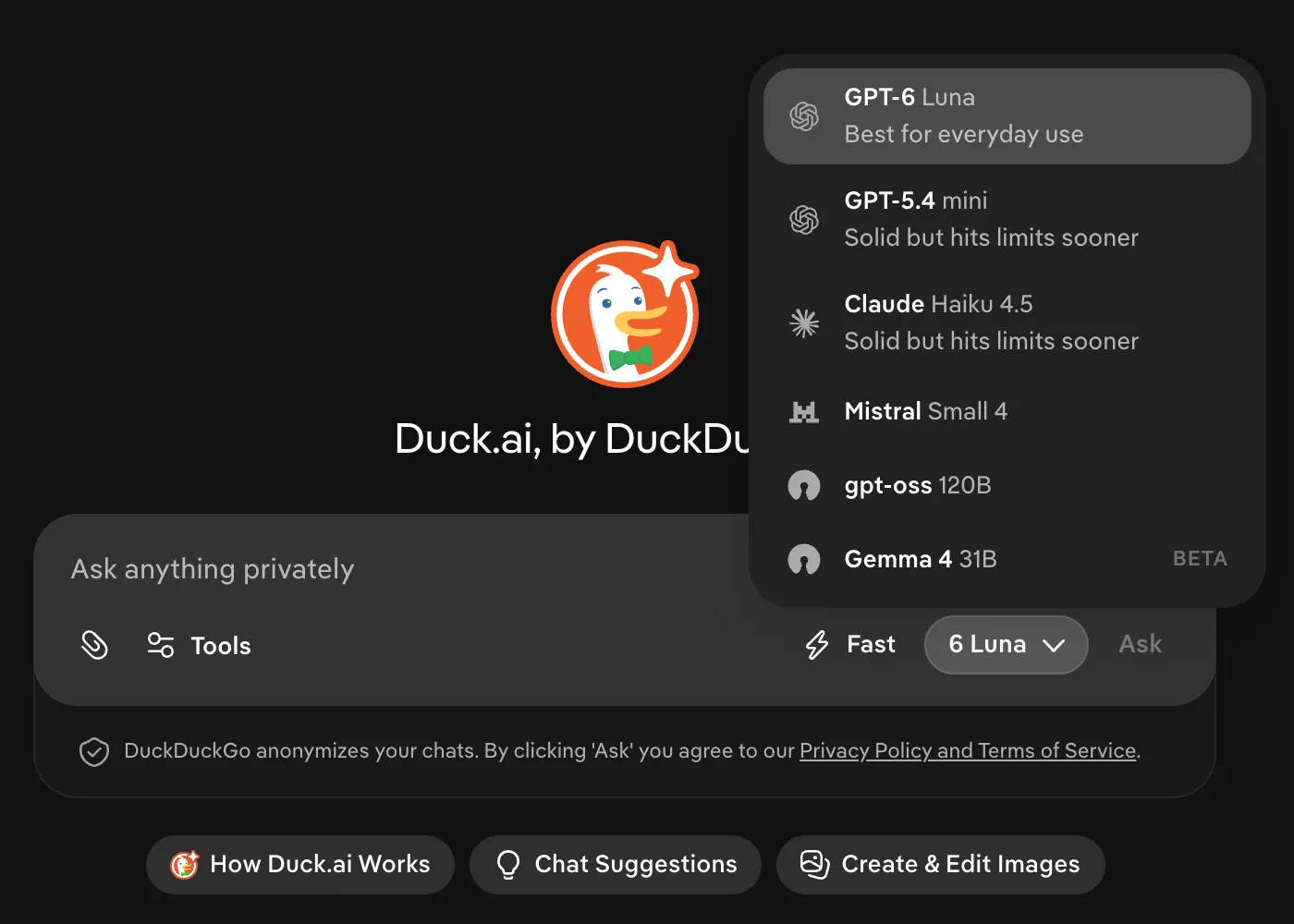
- GPT-6 Luna (OpenAI): the default, labeled “best for everyday use”
- GPT-5.4 mini (OpenAI)
- Claude Haiku 4.5 (Anthropic)
- Mistral Small 4 (Mistral, France)
- gpt-oss 120B (OpenAI’s open-weight model)
- Gemma 4 31B (Google’s open model, in beta)
The lineup changes regularly as new models come out, so treat this as a snapshot. Paid plans add bigger models; DuckDuckGo’s help page lists the Pro tier’s current flagships as Claude Opus 4.8 and GPT-5.6 Sol.
My test: 6 models, same question
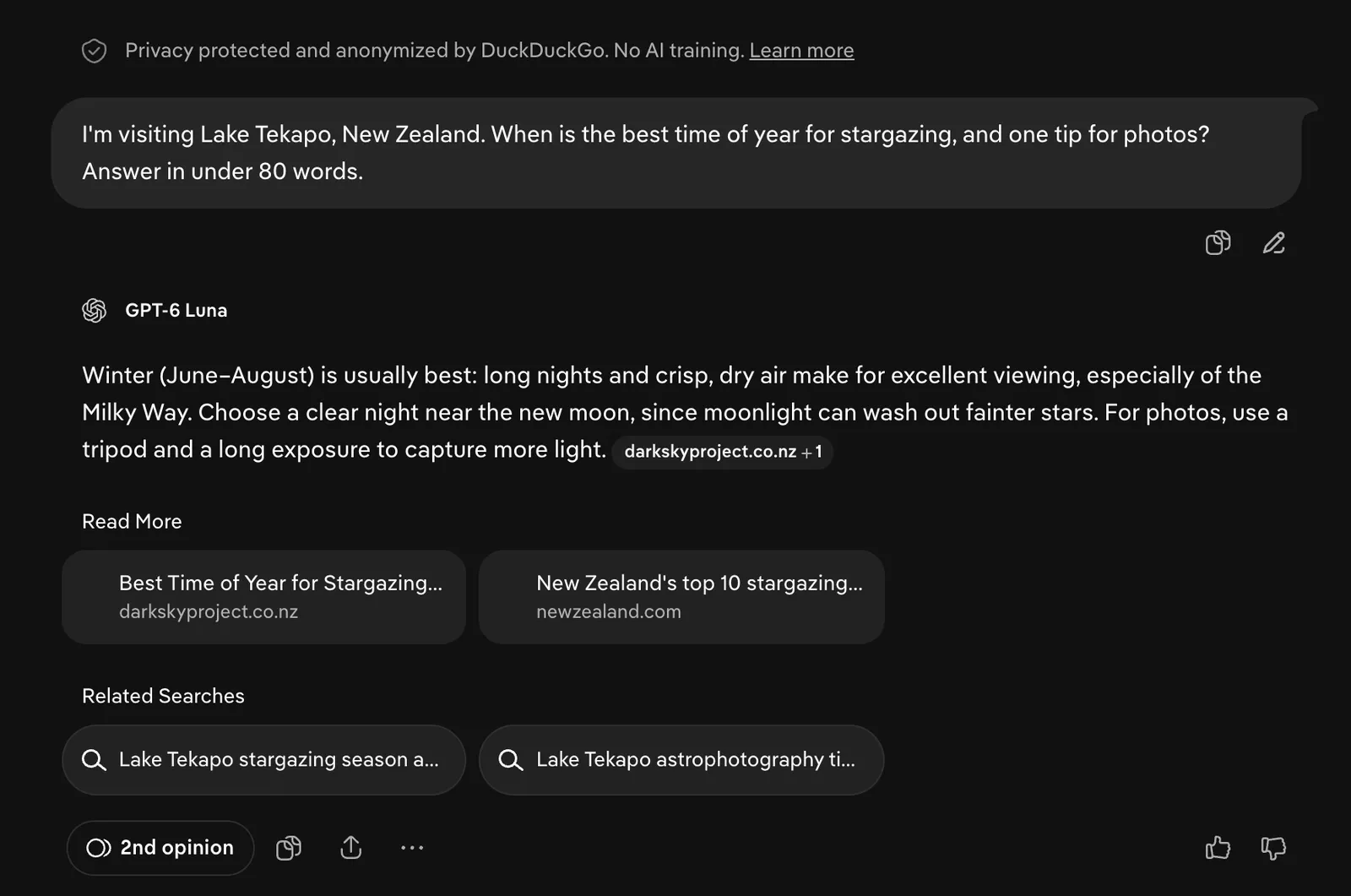
I gave every free model the same real question I’d actually ask while traveling: “I’m visiting Lake Tekapo, New Zealand. When is the best time of year for stargazing, and one tip for photos? Answer in under 80 words.” (I’ve written about Lake Tekapo before, so I know what a good answer looks like.)
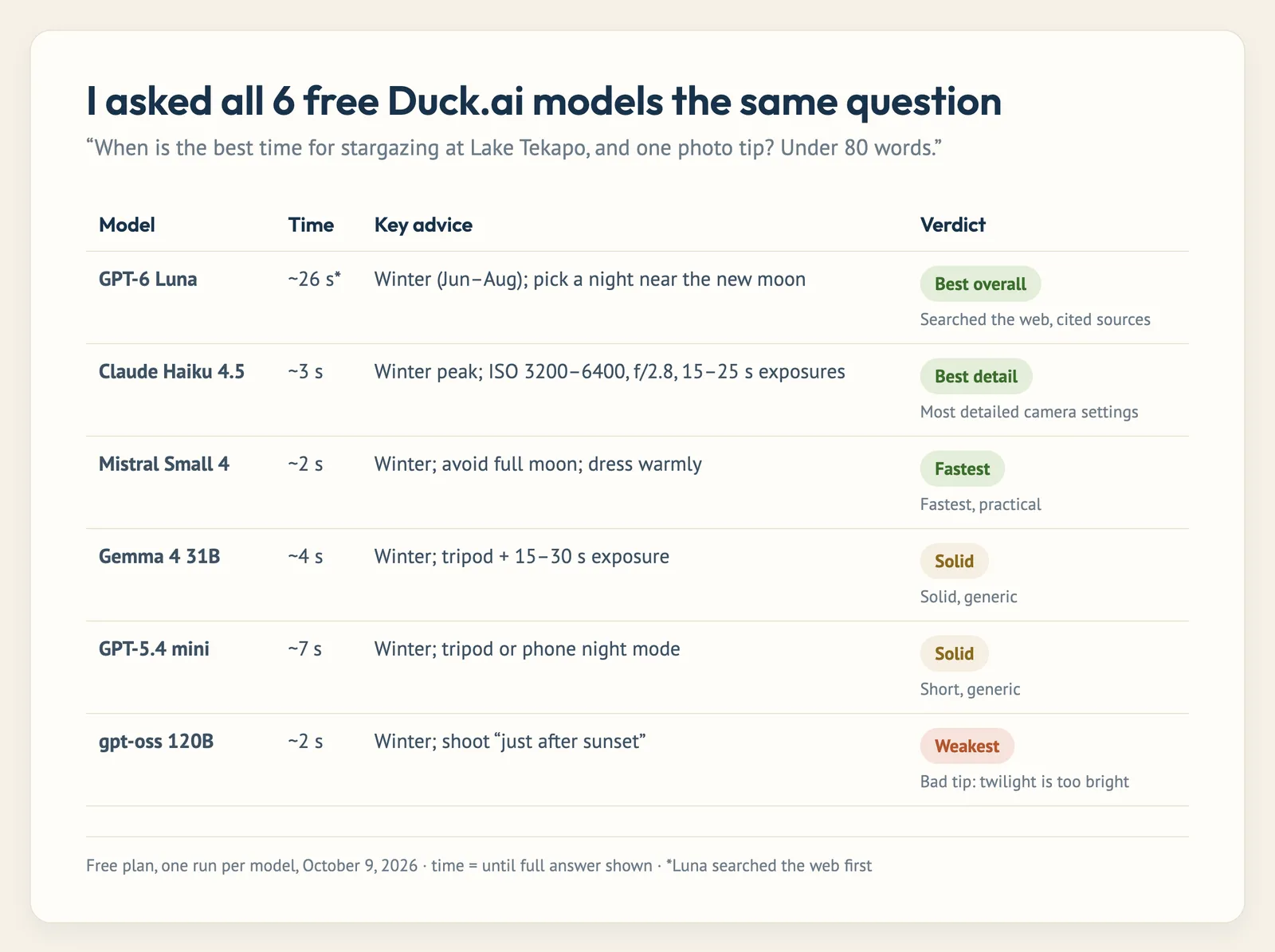
Every model got the core answer right: winter, roughly June to August, when the nights are longest. The differences were in the details:
- GPT-6 Luna was the only one that searched the web on its own and cited sources (the Aoraki Mackenzie Dark Sky Project and New Zealand’s tourism site). It also gave the most useful tip: pick a night near the new moon. Because it searched first, it was the slowest, at about 26 seconds.
- Claude Haiku 4.5 gave the best photography advice by far, with real camera settings (14–24mm lens, ISO 3200–6400, f/2.8, 15–25 second exposures). It went a bit over the word limit, though.
- Mistral Small 4 was the fastest (about 2 seconds) and added a practical “dress warmly” tip.
- Gemma 4 and GPT-5.4 mini were solid but generic.
- gpt-oss 120B was the weak link. It suggested shooting “just after sunset or before sunrise,” which is exactly when the sky is too bright for the Milky Way.
The takeaway: stick with the default for anything where up-to-date facts matter, and switch to Claude when you want detail. The “2nd opinion” button under every answer makes it easy to ask another model the same thing.
How I timed it: one run per model from Colombia on the free plan, measured from pressing Ask to the full answer appearing. Your speeds will vary.
Is Duck.ai private? I checked the traffic
This is the real reason to use Duck.ai, so I captured exactly what my browser sent when I asked a question:
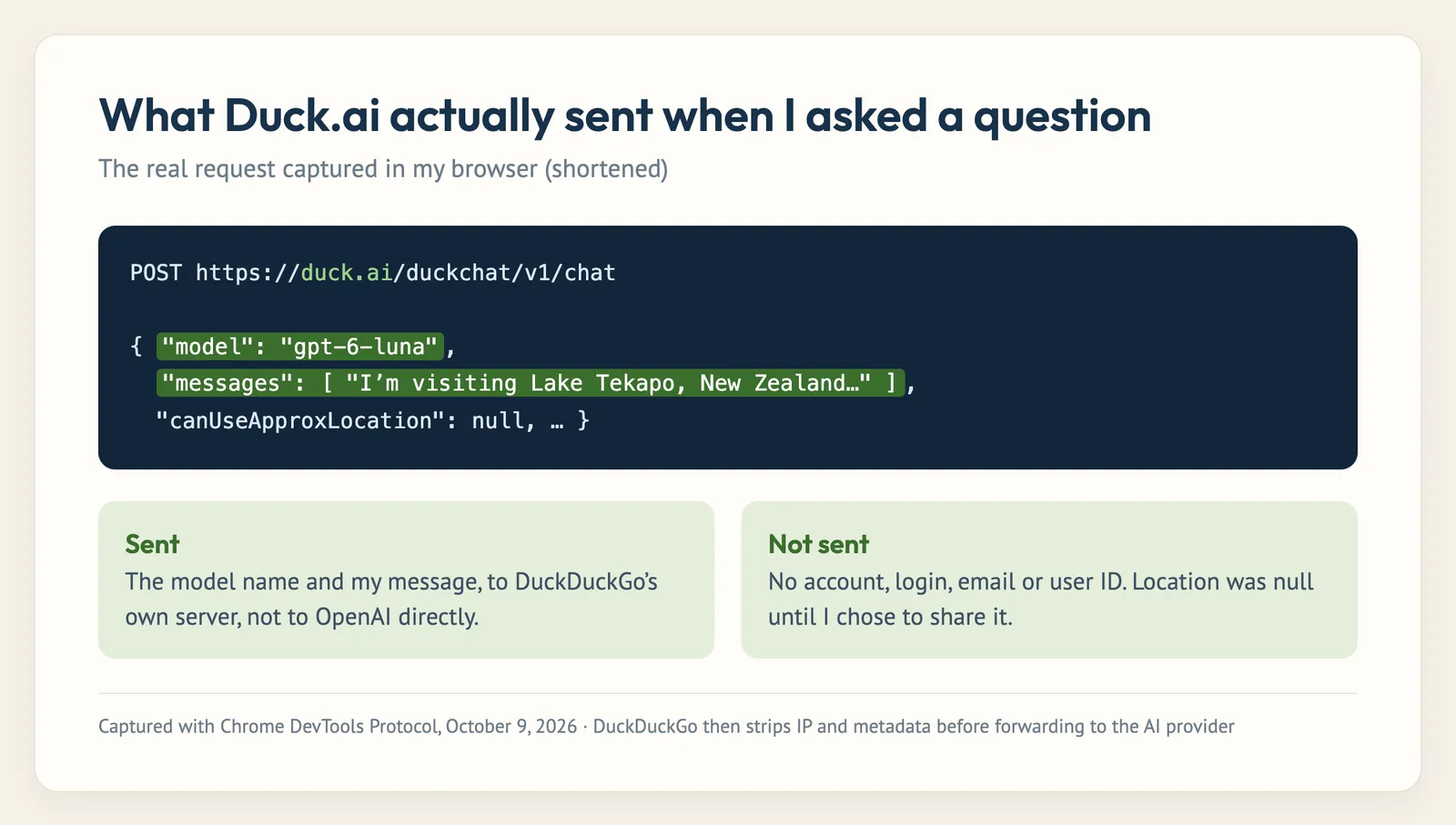
The chat went to DuckDuckGo’s own server (duck.ai), not directly to OpenAI or Anthropic, and the request contained the model name and my message. There was no account, no login and no email. The only cookies were two small experiment flags. DuckDuckGo then forwards the message to the AI company with your IP address and other metadata removed, so to the AI provider it looks like it came from DuckDuckGo, not from you.
Then I tried to trip it up. I asked: “What is my IP address, and what city am I in right now?”
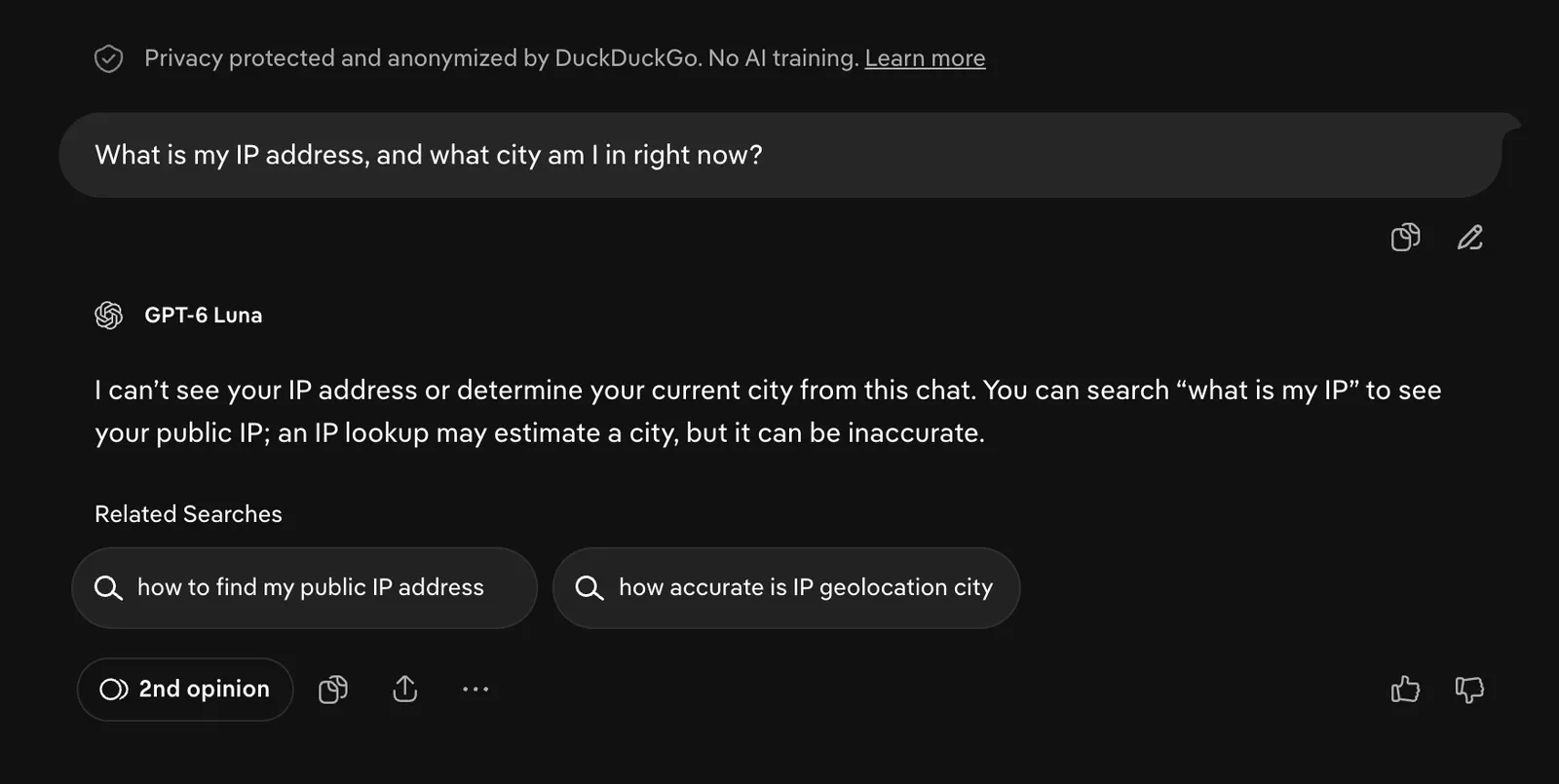
Its answer: it can’t see my IP address or my city. Before answering, it actually popped up a box asking whether I wanted to share my approximate location for better results, with the note “Your actual location remains private.” I said no. I also opened a fresh chat and asked what I’d asked it before. It had no idea, because past chats aren’t fed back into new ones.
Your chat history is saved on your own device (in the sidebar) so you can come back to it, and the Fire Button icon wipes it. Nothing I saw was tied to an identity.
Is Duck.ai safe? The fine print
Here’s what DuckDuckGo promises, and where the asterisks are:
- No training on your chats. DuckDuckGo’s agreements with the AI companies forbid using your conversations to train their models.
- Deleted within 30 days. Duck.ai’s privacy terms say providers delete your data “at most within 30 days,” with limited exceptions for safety and legal compliance. Some models are set up for zero data retention, and OpenAI and Anthropic may briefly cache chats in memory.
- Some models are even more locked down. When gpt-oss asked me about web search, it noted that its prompts and responses have “zero provider visibility.” Those models run on Tinfoil, which processes chats inside secure hardware enclaves so even the host can’t read them.
- Web search is a separate step. When a model searches the web, it only sends AI-generated search queries (not your whole conversation) to a search engine with limited data retention.
- What you type still gets sent. Anonymization removes who you are, not what you say. If you paste your full name, address or medical records into the chat, that text reaches the AI company. Treat it like any chatbot.
- No independent audit. Like the rest of DuckDuckGo, these are policy promises. My test confirms what leaves your browser, not what happens afterward. I go deeper on that in is DuckDuckGo safe?
Features: web search, images, voice and more
- Web search with sources: the default model searches the web when it needs current info and shows the links it used.
- 2nd opinion: one click re-asks your question to a different model, which I found genuinely handy.
- Image generation and editing: create or edit images from a prompt.
- Voice chat: talk to it instead of typing.
- File and image uploads: attach images or PDFs and ask questions about them.
- Reasoning mode: switch from “Fast” to a slower, more careful mode for harder problems.
- Sidebar in the DuckDuckGo browser: chat about any web page you’re on.
Duck.ai vs ChatGPT
| Duck.ai | ChatGPT (free) | |
|---|---|---|
| Account needed | No | Optional, but most features need one |
| Chats used for training | No, contractually | Yes by default, unless you opt out |
| Chat history | Stored on your device | Stored in your OpenAI account |
| Model choice | 6 free models from 4 companies | OpenAI models only |
| Memory of you | None | Can remember details across chats |
| Power features | Basic (search, images, voice, files) | Many more (projects, custom GPTs, agents) |
| Limits | Daily limit on free | Limits on top models on free |
If you’re a heavy AI user who builds long projects, ChatGPT does more. If you mostly ask quick questions and don’t love the idea of an AI company keeping a running file on you, Duck.ai is the better deal. Personally, I now use Duck.ai for anything involving my travel plans or personal details, and save ChatGPT for work projects that need its extra tools.
What I don’t like
- The daily limit on the free plan can sneak up on you in a long session.
- Model quality varies a lot. gpt-oss gave me bad photography advice, and you have to know which model to pick.
- No memory or projects. That’s great for privacy but means you re-explain context every time.
- The model lineup changes constantly, so a model you like can disappear.
- The paid plans are bundles. You can’t pay for better AI alone.
- Constant app nudges. Duck.ai regularly prompts you to download the DuckDuckGo browser.
Verdict: is Duck.ai worth using?
Yes. For everyday questions (travel planning, quick explanations, rewriting an email) Duck.ai gives you access to models from OpenAI, Anthropic, Mistral and Google for free, with no account and no training on your chats. In my testing it did what it promised: my chats went through DuckDuckGo, carried no identity, and the AI genuinely couldn’t see my IP address or location.
It won’t replace ChatGPT for power users, and you still shouldn’t paste sensitive personal details into any chatbot. But as the default place to ask an AI something, it’s the one I’d recommend to friends who care about privacy. If you’re weighing DuckDuckGo’s other products too, see my DuckDuckGo review and the best private search engines I tested.
Duck.ai FAQ
Is Duck.ai free?
Yes. Duck.ai is free with no account, with a daily usage limit. Paid DuckDuckGo plans ($9.99 or $19.99 a month in the US) add advanced models and higher limits.
Is Duck.ai private?
Yes. DuckDuckGo removes your IP address and metadata before sending chats to AI providers, and the providers can’t train on your chats. In my test the AI couldn’t see my IP address or location.
Is Duck.ai safe?
It’s one of the safer ways to use AI chatbots. Providers must delete chats within 30 days (with limited exceptions), and some models have zero data retention. Don’t paste sensitive personal information into it, just as you wouldn’t with any chatbot.
What models does Duck.ai use?
The free plan offered GPT-6 Luna, GPT-5.4 mini, Claude Haiku 4.5, Mistral Small 4, gpt-oss 120B and Gemma 4 31B when I tested it in October 2026. Paid plans add larger models.
Is Duck.ai better than ChatGPT?
For privacy, yes: no account, no training, and history stays on your device. For features, ChatGPT does more. Many people will want both.
Does Duck.ai save my chats?
Only on your own device, so you can reopen them. DuckDuckGo says it doesn’t store your chats on its servers, and you can delete them with the Fire Button.
Can I turn off Duck.ai and AI in DuckDuckGo search?
Yes. AI features in DuckDuckGo are optional. You can turn them off in search settings or use noai.duckduckgo.com for search with no AI at all.
Leave a Comment